Article
How to Convince Your Principal That Your Whole School Needs Common Planner
Discover the benefits of a school-wide subscription and get a ready-to-send email to help you make the case.
Click to see Cc4.0’s undo button in action!
Click to see Cc4.0’s undo button in action!
Alexander Pope said “To err is human but to forgive is divine”. Everyone knows how frustrating it can be to err while planning, so wouldn’t it be divine if your lesson planner was as forgiving as possible?
Well, with Common Curriculum 4.0 we’re releasing a universal undo button that lets you take back any action that you’ve made while lesson planning. As someone who loves tinkering with his long-range plans, I have been waiting a long time for this, and can’t be more excited to tell you about it!
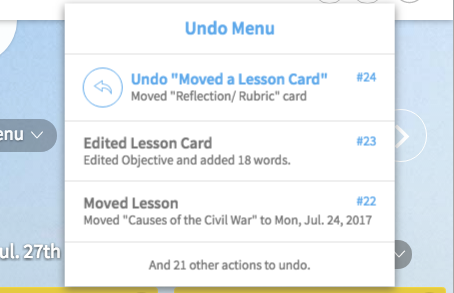
The moment that you log in to Cc and navigate to your planbook, the undo button begins keeping a list of every action you’ve taken that session.
If you do something you don’t like, just click “Undo” at the top right of the screen and you’ll see a description of the last action you’ve taken. Clicking the action will undo it.
Since the undo button has keeps track of everything you do each session, you can undo multiple actions in a row! Moreover, if you undo a few actions, then do something new, you can still undo that new change and then continue to undo any of the old actions you took before you made that change:
An important note: the universal undo button will not track every little change you’ve made to the text of a card. It will only let you undo everything you did in between putting your cursor in a card and clicking outside of that card.
When this teacher clicked undo, the card reverted back to the words “scholars will be able to” because those words were already there when they put their cursor in the card.
If you want to undo smaller text changes, then just use the mini undo and redo buttons in the rich text bar:
Want to undo just a few words and not every change you’ve made since putting your cursor in a card? That’s what the rich text tool bar is for!
Forgiving, indeed!
At this point, you may ask yourself “what can’t the undo button do”? The undo button can only undo actions you’ve taken this session. Every time you close Cc’s browser tab or navigate to a new website in the same tab, you’re telling the undo button “hey forget the actions I’ve taken before… this is a new session.
Keep reading
Discover the benefits of a school-wide subscription and get a ready-to-send email to help you make the case.
A shared planbook helps co-teachers stay aligned, add student supports, and plan together even when they can't meet.
Make substitute teacher plans easier with Common Planner. Keep lessons, materials, and directions together, then share exactly what your sub needs.