Article
How to Convince Your Principal That Your Whole School Needs Common Planner
Discover the benefits of a school-wide subscription and get a ready-to-send email to help you make the case.
If you’re someone who gets worried when your tools change their designs, never fear! These changes are small and it should take you less than a minute to get…
If you’re someone who gets worried when your tools change their designs, never fear! These changes are small and it should take you less than a minute to get adjusted!
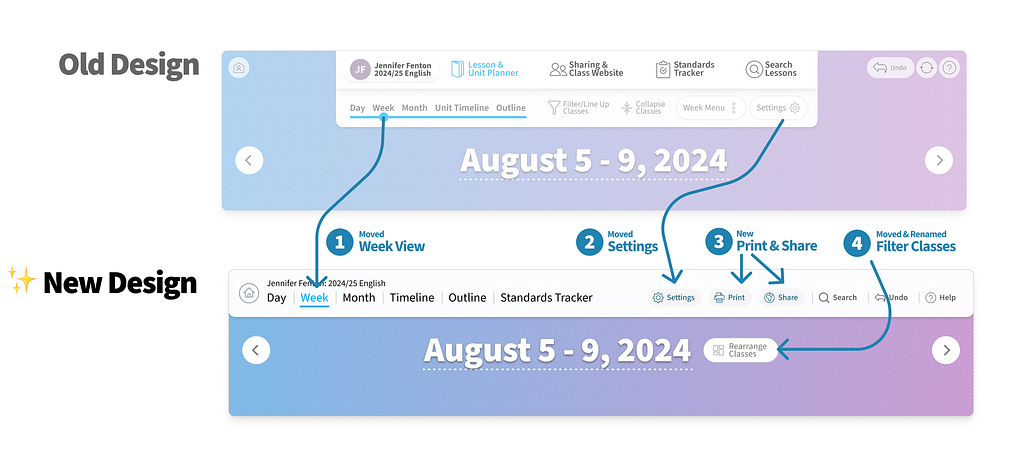

Common Curriculum, your favorite online lesson planner, just got even better! Our brand-new nav bar is designed to make your planning process smoother and faster than ever. You’ll love how easy it is to access all your favorite features with just a click or two! Don’t worry — All the same great features are still there, just redesigned for better usability.
Here’s why you should check out the new nav bar:
The new nav bar has a clean look that’s easy on the eyes and even easier to navigate. Say goodbye to clutter and hello to a simplified, organized interface that helps you find what you need in no time.
The settings, help, and undo buttons are now consistently placed for quick and easy access.
We’re excited for you to try out the new nav bar and can’t wait to hear what you think! Share your thoughts and suggestions with us — we’re all ears.
Happy teaching (and navigating)!
Keep reading
Discover the benefits of a school-wide subscription and get a ready-to-send email to help you make the case.
A shared planbook helps co-teachers stay aligned, add student supports, and plan together even when they can't meet.
Make substitute teacher plans easier with Common Planner. Keep lessons, materials, and directions together, then share exactly what your sub needs.