Article
5 Ways a Shared Planbook Makes Co-Teaching and Co-Planning Easier
A shared planbook helps co-teachers stay aligned, add student supports, and plan together even when they can't meet.
We’ve made some huge improvements in this latest release of Cc, and a bunch of which have gone to making monthly planning faster and more responsive. Since…
We’ve made some huge improvements in this latest release of Cc, and a bunch of which have gone to making monthly planning faster and more responsive. Since everyone loves listicles, here are the five ways we’ve improved the month layout in Cc 4.0:
Speaking of customizing views, you now have three great options for changing how your lessons are displayed on the month view:
Vertical lesson columns for the win! That’s the same as the old year view for all you vintage Cc fans. Lining up classes and filtering to groups of classes are pretty neat too!
Want to learn about all the ways you can use the customize view button? Read our post about it!
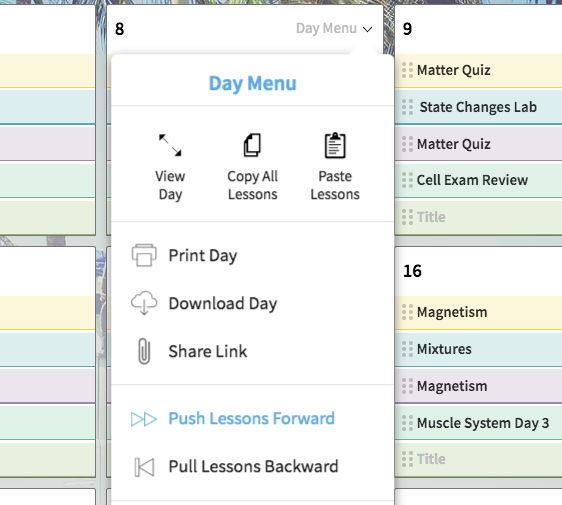
Speaking of things that are fast, you can use the new day menu from inside the month calendar! Want to bump an entire day’s worth of lessons forward or pull a day’s worth of lessons with one click? Want to quickly turn several classes on or off? Well now you can!
Just hover over a date in the month calendar, and you’ll see the day menu appear. Click on it to get access to all those juicy whole-day actions.
Or read our post about the new day menu if you want to learn more about everything it can do!
You may have noticed the new undo button floating at the top right of every screen. It remembers every action you’ve taken in any individual session of Cc (i.e. until you close the tab or go to another site in your current tab), which means you can undo anything you’d like at any time, including moving lessons on the month calendar:
It’s awesome to know that regardless of how much I fuss with the order of my lessons, I can always undo those edits if I change my mind!
Planning lessons inside the month view is way faster now in Cc 4.0! Previously, if you clicked on a lesson plan in the month view, the entire day containing that plan would pop up in a sidebar, and then you would have to scroll down to the correct spot on that day to work on that lesson.
But now, when you click on a lesson, that lesson simply pops up on the right side of the screen:
Getting to the lesson you want in the month layout is so fast now!
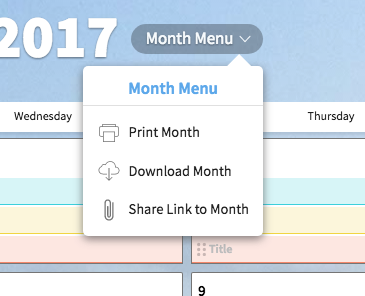
Instead of being crammed way up at the top right of the page, the button for printing, downloading, or sharing an entire month calendar is right there in the middle of the page next to the date. Plus you can now share a link to any month with just a single click:
Keep reading
A shared planbook helps co-teachers stay aligned, add student supports, and plan together even when they can't meet.
Make substitute teacher plans easier with Common Planner. Keep lessons, materials, and directions together, then share exactly what your sub needs.
Compare the best AI lesson plan tools for teachers in 2026 and learn which ones help you create, organize, revise, and reuse lessons as part of your real planning workflow.