Article
How to Convince Your Principal That Your Whole School Needs Common Planner
Discover the benefits of a school-wide subscription and get a ready-to-send email to help you make the case.
When we taught, we spent most of our planning time writing lessons for the following week, so anything that made weekly planning faster, made our lives…
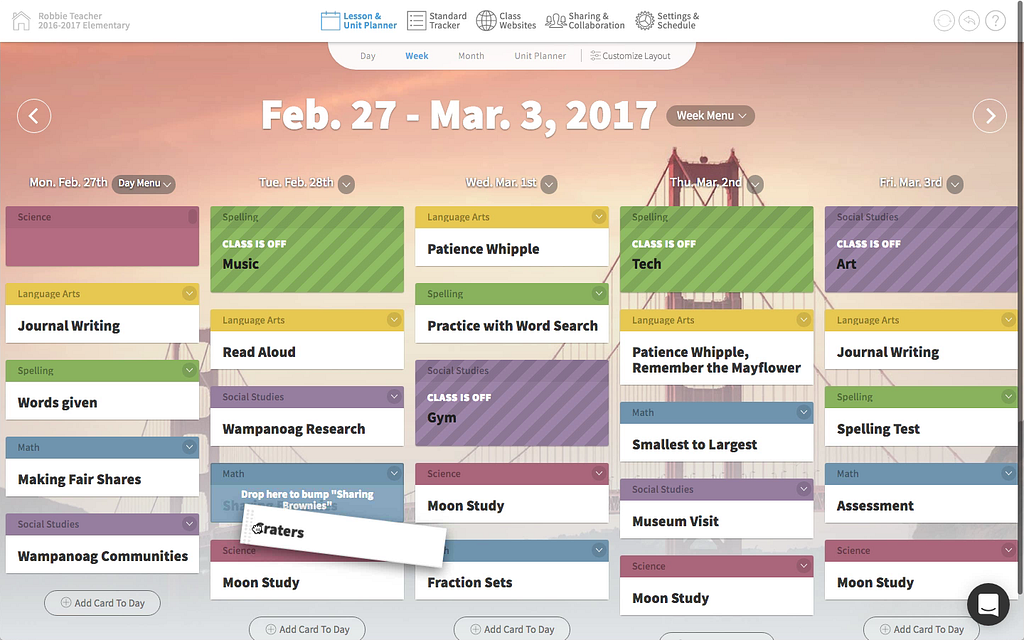
When we taught, we spent most of our planning time writing lessons for the following week, so anything that made weekly planning faster, made our lives easier…. which is why I’m so pumped to tell you about all the new features we’ve added to the week layout in Common Curriculum 4.0!
One of our teachers’ favorite ways to use Cc is to make adjustments to their weekly plans by dragging cards between lessons… or even by dragging whole lessons themselves. Unfortunately, dragging a card between lessons can require a ton of scrolling if those lessons are on the long side! So, now when you drag a card, all of the other cards in all your lessons collapse, making it easier to find the exact spot where you’d like to drop it:
The new dragging interface makes it way easier to move cards and lessons around when you have longer than average plans
Plus, when you drag a lesson, the same thing happens, except now all your lessons collapse, making it super easy to put your lesson in the right place, even if your classes aren’t lined up at them moment.
While we haven’t fully automated A/B schedules yet (we’re working on it), we have made it much easier for people that teach on rotating schedules to quickly plan a week of lessons in Cc. That’s on account of the fancy new on/off buttons in our fancy new day menu.
Simply click on one of the five dates at the top of the week view, and you’ll see the menu for that day pop up. Then you can toggle any of your classes on or off for that day with one click:
Great for A/B schedules, half days, or surprise assemblies (you’ll want to bump your lessons forward first, if it’s a surprise assembly)
First things first, we’ve added a new button called “customize layout”. It’s on the day and month views too, but it’s probably most consequential when used on the week view. It lets you change three options about how your lessons are currently being displayed on the screen:
Those options are great on their own, but become truly powerful when you combine them, almost like creating recipes for different types of lesson planning workflows…. in fact those recipes are so great that we wrote a whole post on them (hint hint, click click)
Speaking of day menus…. we have day menus! …. with a ton of actions that affect all the lessons on a day! We hear from a lot of teachers that they truly fell in love with Cc once they discovered the lesson menu, because it takes a simple and flexible lesson planner and puts it on steroids. So, we figured “why not make a menu for the entire day as well?”. We put every action we could think of in that menu, and I explain each of those actions in more detail in this post, but I think there are two buttons that are obviously cooler than the rest:
Boom. Snow days = conquered.
Unit titles now appear above lesson titles on the day, week, month, and unit layouts! Just click on a unit title to compare that unit side by side with its lesson. Oh, and as a bonus, we’ve also added unit standards to the standards tracker.
Here’s an awesome way to use these two new features in tandem:
You can compare units with lesson from the day, moth, and unit planner layouts too!
Once we built the day menu, we realized that it was super helpful and clear to have all the actions associated with a unit of time to be put into their own menu… so we built a week menu too! Right now, the week menu serves as a clearer and more obvious location for printing, downloading and sharing links to lessons:
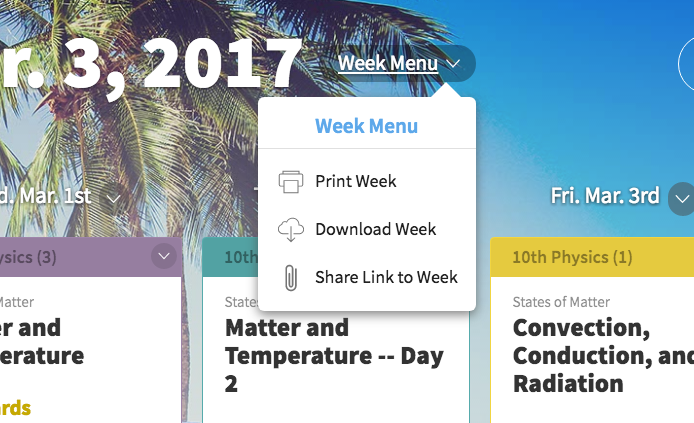
In the future, if we add any more actions that affect an entire week, we’ll put them here.
Vertical space is at a premium when you’re planning, so we’ve collapsed the card buttons to make it easier to see longer lessons. It’s definitely a small change, but we did it to make the little things you do every day in Cc that much easier. Also we think the new buttons quite a bit prettier as well:
Keep reading
Discover the benefits of a school-wide subscription and get a ready-to-send email to help you make the case.
A shared planbook helps co-teachers stay aligned, add student supports, and plan together even when they can't meet.
Make substitute teacher plans easier with Common Planner. Keep lessons, materials, and directions together, then share exactly what your sub needs.